What is the best approach and strategy for your business: investing in a
new management information system or upgrading your current setup?
Rob Fletcher speaks to a range of suppliers, and finds out more
Rob Fletcher
April 8, 2026
It is widely accepted that having a computerised new management information system (MIS) is crucial to the success of a modern-day print business. While some companies still use a tried-and-rested pen and paper method to keep track of print production, the majority have switched to digital channels to oversee operations.
The benefits of the latter approach are plentiful and have been well publicised. What is not perhaps quite as well understood is what to do if you want to switch up your current MIS system; do you seek upgrades from your current provider or go all out and move to a new system altogether?
Here, Print Monthly sits down with several MIS providers to establish the approach that will work best for you and your company.
Support Future Growth
Up first is Rob Thurston, UK sales manager at PrintIQ. He says the best approach depends on the age, flexibility, and scalability of the print service provider’s (PSP) current system. He adds that if an MIS is legacy software that lacks cloud functionality, integration options, and modern automation, a complete overhaul is usually more cost effective in the long run.
“PrintIQ, for example, offers a cloud-based, modular platform designed to replace outdated systems while minimising disruption,” Thurston explains, adding: “However, if an existing MIS is modern, supported, and adaptable, upgrading or extending it can be a practical option.
If an existing MIS is modern, supported, and adaptable, upgrading or extending it can be a practical option
“The key is evaluating whether the current system can support future growth, new print technologies, and increasing customer demand. In many cases, transitioning to a modern, cloud-based MIS like PrintIQ provides better long-term ROI than continuing to patch an aging system.”
PrintIQ has continued to expand its MIS platform with new automation features, enhanced reporting tools, and deeper integration capabilities. Recent updates focus on improving workflow efficiency, reducing manual data entry, and providing clearer insights into profitability and performance. PrintIQ has also strengthened its web-to-print integration options, enabling printers to connect online ordering directly to production and fulfilment workflows.
PrintIQ says high-quality MIS should deliver automation, visibility, and scalability
“Ongoing development includes smarter scheduling, and expanded analytics to help printers make more data driven decisions,” Thurston says, adding “With a strong emphasis on innovation, PrintIQ aims to support printers in increasing efficiency, improving customer service, and maintaining profitability in an increasingly competitive print market.”
On this, Thurston offers more general advice on what to look for if you are in the market for a new MIS. He says a high-quality MIS should deliver automation, visibility, and scalability, while PSPs should also look for software that streamlines estimating, job costing, scheduling, inventory management, invoicing, and reporting in a single integrated platform.
“Real-time data access is essential for monitoring job profitability, production efficiency, and sales performance,” he says, continuing: “Integration capabilities are another priority, a strong MIS should connect seamlessly with accounting tools, web-to-print portals, prepress software, and production equipment. Ease of use and strong onboarding support are also critical, ensuring staff can adopt the system quickly.”
Minimise Disruption
Elsewhere, Sam Yarnall, marketing and sales director at Clarity Software, says many legacy MIS platforms have reached the limits of what they can reasonably support. She says years of job history may be locked in outdated software with no clean upgrade path and attempts to modernise them often result in broken workflows or missing functionality. In those cases, a clean transition to a modern, cloud-native MIS is usually the better option.
“The key is to minimise disruption,” Yarnall advises, continuing: “Businesses should look for systems that allow them to trial the software properly, using real jobs, without large setup fees or long-term commitments. A full overhaul does not have to mean starting from scratch if the migration is handled carefully and with strong onboarding support.
Businesses should look for systems that allow them to trial the software properly, using real jobs, without large setup fees or long-term commitments
“A quality MIS should reduce admin stress, not add to it. That means a single source of truth where quotes, artwork, job progress, production notes, and invoices are stored together. Information should flow naturally from one stage to the next, without retyping or manual checks.”
Yarnall goes on to say that visibility is critical, explaining teams need to see job status in real-time so deadlines are predictable rather than guessed. She adds pricing must be consistent and up to date, particularly in an environment of rising material costs, and that the system must be intuitive enough to enable new staff to be productive quickly.
Iteba offers versions of SolPrint covering all manufacturing types including digital, litho, web, screen, wide-format, and labels
“Just as important is the support model,” Yarnall adds, continuing: “Printers should look for a provider that understands the print industry and offers hands-on onboarding, ongoing support, and flexibility rather than locking customers into rigid contracts.”
As for Clarity Software, Yarnall says the company continues to invest in features that simplify the most error-prone parts of print workflows. One recent example is the launch of Artwork Approvals for Clarity Go Premium, a feature that consolidates the entire artwork review and approval process into one place, replacing fragmented email chains and version confusion.
“Artwork can now be uploaded, reviewed, commented on, and approved directly within Clarity, starting at the quote stage,” Yarnall explains, adding: This reduces delays, prevents costly reprints, and keeps both customers and production teams aligned. It reflects Clarity’s broader approach: building practical tools that reduce friction, build confidence, and give businesses the clarity they need to grow calmly and sustainably.”
Seamless Integrations
Peter Griffin, managing director of Iteba, agrees that it is important to not just implement an MIS, but continually evolve it. He says that as new technology and functionality is available, it can help streamline business processes – whether this is by updating existing software or turning to a new provider, depending on the current system in place.
“In today’s world you should be running a browser-based MIS, which makes the system more far-reaching and accessible,” Griffin says, continuing: “The MIS provider should demonstrate their continual development of the system, so you are not left behind by your competition.
The MIS provider should demonstrate their continual development of the system, so you are not left behind your competition
“An API should allow for seamless integrations eliminating duplication and errors, which will result in more profit. So, if your existing MIS does not provide this, move to a platform that will be the cornerstone of your business.”
Griffin goes on to say an MIS should form the “cornerstone” of a print or print management business, bringing various stakeholders together and providing them with instant feedback on performance. He says a browser-based MIS that provides access from diverse systems over multiple platforms or devices will help the business to grow efficiently and profitably.
“The system should allow staff, customers and suppliers to interact with the MIS either directly or via the API,” he says, adding: “The system should have an intuitive, reactive interface that ensures information available from the MIS provides real-time notifications of business issues or opportunities for all users dependent on their roles.”
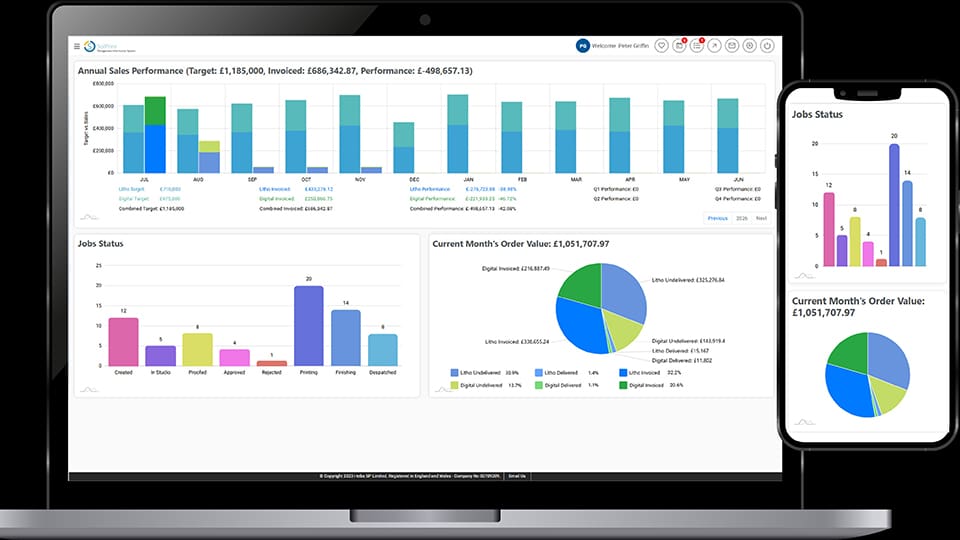
With this, Griffin says SolPrint, available from Iteba, is a very flexible system, allowing it to fit with the business requirements rather than enforce workflow changes. New developments with SolPrint include a new large-format and POS focused estimating engine, as well as integration between the ‘Finished Good Stock’ and ‘Estimating’ modules, allowing for items such as exhibition stands to be included within the main quote.
Factoid: Modern print MIS solutions can track hundreds of live production variables per job, from substrate and ink usage to press time and finishing stages
Other recent changes include updated campaign management functionality, allowing for jobs to be created from a client- supplied spreadsheet with the campaign items and store requirements automatically generated.
SolPrint is available as either a hosted cloud based rental solution or a traditional purchased software option, making it affordable to all. Iteba offers versions covering all manufacturing types including digital, litho, web, screen, wide-format, and labels, as well as a print buyer version for print management companies.
Avoid “End-of-Life” Products
Elsewhere in the market, Trevor Cocks, owner and founder of Accura MIS, agrees that the decision to upgrade or take on new software depends on whether the MIS vendor is still committed to developing the existing product, or if it is “end-of-life” and the relationship between the customer and vendor has depleted.
“If the product is being actively developed and meets most of the customer’s needs, and the relationship between the two parties is good, then it may make sense to update the current system to the latest version,” Cocks says, adding: “If the existing vendor has made false promises regarding development or features, is giving a poor quality of service, or there is no progression path into areas like ecommerce, then the MIS can in fact be holding the customer back.
“In those circumstances the printer may be better to find another solution that is built for modern printers, has the modules available for expansion, and is actively developing their solution and providing good service levels.”
Trevor Cocks of Accura MIS says PSPs should look for full integration and not have to spend money on custom APi development with MIS
Should the PSP take the latter option, Cocks offers some words of advice on what to look for in a new MIS. He advises that the software should be an actively developed solution and not a product at risk of being “end-of-life”. It should also be web-friendly, suitable for the niche market where the user works, and be a modular system that allows for expansion.
Cocks also says that PSPs should look for full integration and not have to spend money on custom APi development, seek a solution with a single database to manage, and that is from one vendor, as well as a supplier that offers local, direct, and personal support from print experts
“Accura360 is constantly being developed with new modules and enhancements to existing modules; we provide one major upgrade per annum and many interim builds adding or enhancing features and fixing bugs,” he says.
Updates to Accura360 include a new, web-friendly user interface with improved navigation and multi-tabbed interface, as well as TransferNow APi integration for seamless cloud file upload in the proofing workflow, online invoice payment, and the latest online portal from Accura in the form of AccuraOnline v7.
Keep Up With a Changing Market
Concluding the discussion is Joe Galeckas, senior sales executive at Wildcare Software, the company behind PrintLogic. Galeckas says if a business is struggling with its existing MIS, a complete overhaul may offer the most effective resolution.
“Printing has changed massively,” Galeckas says, adding: “It was mainly litho work; steady, predictable. Now, you’ve got digital, large-format, and outsourcing mixed in. Businesses quote a job planning to print it in-house, then outsource when the order comes. You are more complex, adaptable, unpredictable; people work from home, jobs move machines and locations, speed matters, and your MIS needs to keep up.
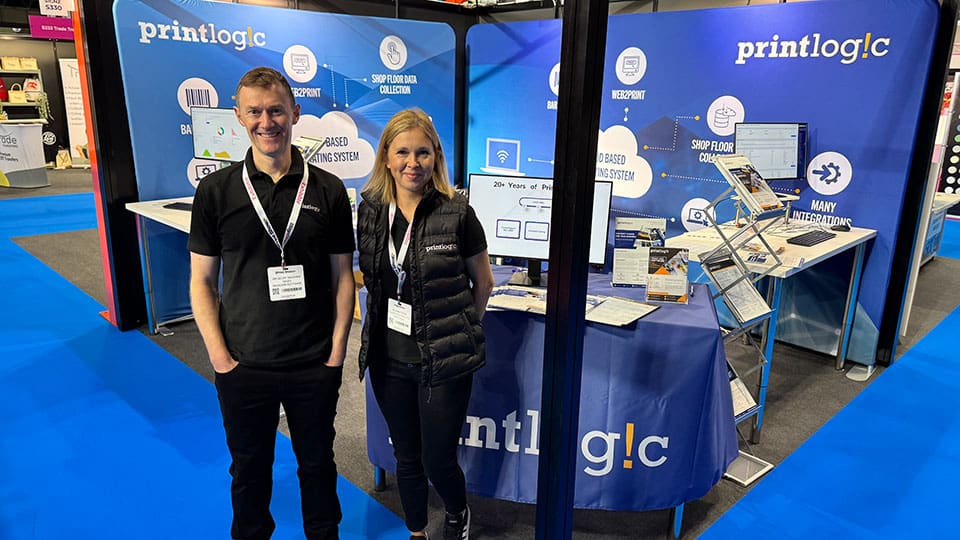
Wildcard Software showcased its latest MIS at The Print Show 2025
“With legacy systems, the supplier goes quiet after implementation and there is no proactive outreach about new features or capabilities. You’re stuck with day-one functionality: they’re maintaining it, not evolving it. A complete overhaul lets you reassess where you are, what works, and what’s missing. You’re not locked into old architecture.”
Listing some of the key features to keep an eye out for when seeking a new MIS, Galeckas highlights ease of use, easy integration, ongoing supplier support, remote access, and stock management as major points. He also flags the importance of transparent pricing with no hidden fees and realistic timelines as being important to effective MIS.
PrintLogic is the primary MIS offering from Wildcard, which recently launched an expanded web-to-print portal for 24/7 customer self-service ordering, which Galeckas says removes constant coordination demands.
Wildcard has also expanded integrations with Xero, QuickBooks, courier companies, design tools, and third-party web-to-print systems – eliminating re-entry across systems. It has also developed a dedicated onboarding team to make sure most customers are fully live within four to six weeks.
While there are differing views on what works best for a print business, in terms of either updating an MIS or a complete overhaul, the theme running throughout this discussion is for companies to ensure they have the best possible solution in place or else they risk falling behind.
From advances in print quality and productivity to increasing demand for automation and sustainable solutions, the wide-format market continues to evolve. Rob Fletcher looks at the latest trends, challenges, and developments in this sector
Speaking to a range of print and signage professionals, we discover how a sustainable business model can drive growth, outlining actionable strategies to cut overhead costs, improve eco-efficiency, and boost your bottom line
As finishing continues to become a great way to add extra elements to your print and wow customers, we take a look at some of the creasers, folders, and collators on the market, and ask experts their advice on finding the right solutions
(this was inserted into the PHP of a code block)
Watch our latest video of the week
Print Monthly gives you the latest video coverage of companies, people, and events from within the print industry.