With so much on their plates, print service providers need all the help they can get to ensure production runs smoothly. Here, we take a look at some of the workflow software solutions that can assist print businesses
Rob Fletcher
March 24, 2025
It is hard to imagine running a business, or even going about your daily lives, without using some form of software. Whether it is installing updated virus protection software on your computer or downloading the latest version of iOS for an iPhone, software is critical to many technologies.
This is certainly true for the print sector, with the performance of hardware dependent on the quality of the software it uses. The same can be said for the print production process as a whole, with workflow software playing a major part in how smoothly your machinery runs and, ultimately, the level of service you deliver to customers.
Here, Print Monthly catches up with several providers in this sector to find out more about the core benefits of investing in and regularly updating workflow software.
Ultimate Efficiency
Up first is Tom Peire, chief executive officer of Four Pees and ‘chief evangelist’ of its Atomyx solution. Peire says that with expectation of quicker turnarounds, coupled with a boom in e-commerce, and the adoption of web-to-print systems, printers need to find ways to streamline production to remain profitable and competitive.
“To this end, many printers already have several systems aimed at increasing their workflow productivity and efficiency in various areas, and for those who don’t, there are umpteen options out there,” Peire says, adding: “However, so many of these systems have silo architectures, and as a result, any efficiencies they deliver are capped by the limitations of those silos.
“Fortunately, solving this is not an impossible challenge. It simply entails an approach called ‘connected automation’, which sees connectors ‘plug in’ different platforms and technologies that didn’t communicate previously. This enables automated systems to exchange information or perform actions based on events such as an incoming order or an updated status in production, all without the need for manual intervention.”
“When considering workflow software options, bearing this holistic approach in mind is crucial if you want to achieve ultimate efficiency.”
Atomyx from Four Pees delivers three products on one platform
From this, Peire offers an insight into Atomyx, a cloud-based SaaS print production management platform that connects print service providers (PSPs) and their technology stacks with print buyers and online print platforms.
“It empowers printers to profitably produce customised print jobs on a massive scale by leveraging cloud technology for unmatched scalability and connectivity, integrating disparate data sources into one central hub, and simplifying the production process,” Peire says.
Atomyx offers three products on one platform. The first, Atomyx Manage, is a connectivity and production management dashboard facilitating efficient workflows within a PSP and between PSPs, print buyers, and online print platforms.
Factoid:Launched in 2024 by Four Pees, Atomyx offers three products on one platform: Atomyx Manage, Atomyx Prepare and Atomyx Layout
Also included is Atomyx Prepare, which, built on callas pdfToolbox technology, is a pre-press/PDF processing API that takes artwork preparation into the cloud, allowing dynamic printability checks, colour conversions, and file preparations.
Finally, Atomyx Layout is, as its name may suggest, a print layout API optimising media usage through automated layout planning for different printing technologies.
Work Should Flow Effortlessly
Another specialist provider in this market is Enfocus, which provides automation software to print businesses. Piet De Pauw, head of marketing at Enfocus, advises printers that are on the lookout for new solutions to prioritise software that seamlessly integrates with every aspect of their production.
“Look for solutions with open architecture and compatibility across different tools and platforms, allowing data and work to flow effortlessly,” De Pauw says, adding: “The goal is to create a unified system where prepress, press, finishing, and even customer-facing tools work in harmony, optimising the whole print process from onboarding to completion.
“This can unlock whole new opportunities for profitability across a business, both by turbocharging the amount of time it takes to complete a job and by freeing up skilled staff to add value elsewhere in the business. If you’ve ever wished there were more hours in a day to clear a few extra jobs, quality automation software like Enfocus Switch is the next-best thing.”
Enfocus Switch allows users to customise workflows and integrate with third-party tools
Going further with this advice, De Pauw recommends working with software that can adapt as your needs evolve. At the same time, he echoes the comments of Peire at Four Pees in urging PSPs to avoid software that operates in silos, saying tools that do not communicate effectively with the rest of your setup can then lead to inefficiencies, errors, and increased operational costs.
“Beware of solutions that overpromise but lack flexibility, locking you into specific hardware or workflows,” he says, adding: “This can severely limit the opportunities your business is able to explore in future and stifle potentially profitable innovations.
“Finally, steer clear of software providers that don’t offer long-term support or robust onboarding – it’s not just about the tool, but how effectively you can use it every day. Find a consultant near you to regularly touch base about implementation progress. You want software to remove limitations from your business, not lock you into a new set of restrictions with an expensive, inflexible new system.”
On this note, he steers the conversation to Enfocus Switch, which he says is designed with one principle in mind – integration drives success. According to De Pauw, Enfocus Switch connects different production components into a cohesive, automated system, making life easier for all those who work with the solution.
“Printers love it because it reduces manual intervention, increases accuracy, and improves turnaround times,” he explains, continuing: “The ability to customise workflows and integrate with third-party tools means it fits perfectly into any production environment, no matter how complex. And it’s modular, so it can grow and adapt alongside your business – that means it will never stop adding value, so the sky is the limit for printers.”
Smooth Integration
Elsewhere and Nate Duckworth is co-founder of Artworker, which, as its name may suggest, supports printers with artwork in prepress. Duckworth says when it comes to investment in new software, printers need to be able to test the waters and see if it is the right fit before fully committing.
“It should be fast to get up and running – minimal training, quick to get value from, and flexible enough to grow alongside your business,” he says, adding: “Equally important is smooth integration with your other systems to avoid manual bottlenecks.”
As for what print companies should be avoiding, Duckworth issues a warning against “walled gardens”, which he says make it difficult to connect with your existing tools.
According to Artworker, its solutions allow users to automatically find and fix common artwork issues in seconds
“These closed systems often lead to vendor lock-in and can hold you back from embracing new innovations,” Duckworth explains, continuing: “Also, be cautious of ‘jack of all trade’ solutions. It’s far better to go for specialist apps that excel in key areas and play nicely with other tools.
“It’s a red flag If you’re being charged exorbitant fees for support or if you’re being tied into a lengthy contract.”
When it comes to Artworker, Duckworth says users can automatically find and fix common artwork issues in seconds. This can be anything from adding bleed and resizing to converting colours and avoiding overprint problems.
“You can literally get up and running in minutes, rather than weeks,” he says, adding: “There is no need to reinvent the wheel or spend thousands of pounds to build standard workflows; Artworker does all the heavy lifting. This is available with our cloud-based file editor and can also be integrated into your e-commerce store or third-party software with our workflow API.”
New Solutions
One thing about software is that the technology never stands still, with new products and updates being released all the time. In January, Solimar Systems, a specialist in workflow automation solutions, rolled out SOLitrack v2.6, pledging “significant enhancements” to its enterprise workflow tracking platform.
The latest version, Solimar says, introduces expanded database support, enhanced job management capabilities, and new API functionalities designed to streamline production workflows.
Stand-out enhancements include support for Microsoft SQL Server 2022, which ensures compatibility with the latest database technologies, as well as new Piece Level Tracking (PLT) capabilities to allow for the creation of subset jobs and enhanced mail piece tracking.
Also new are advanced job management features such as customisable mail piece reprint options, expanded API functionality for mail scan data and job management, and enhanced JDF device support with new options for Canon, HP Elite, and EQUIOS devices.
“SOLitrack 2.6 represents our commitment to delivering robust, enterprise-level workflow solutions that meet the evolving needs of our customers,” says Mary Ann Rowan, chief experience officer at Solimar, who adds: “The new features and capabilities enable organisations to achieve greater control and visibility over their production processes.”
Ready to Integrate
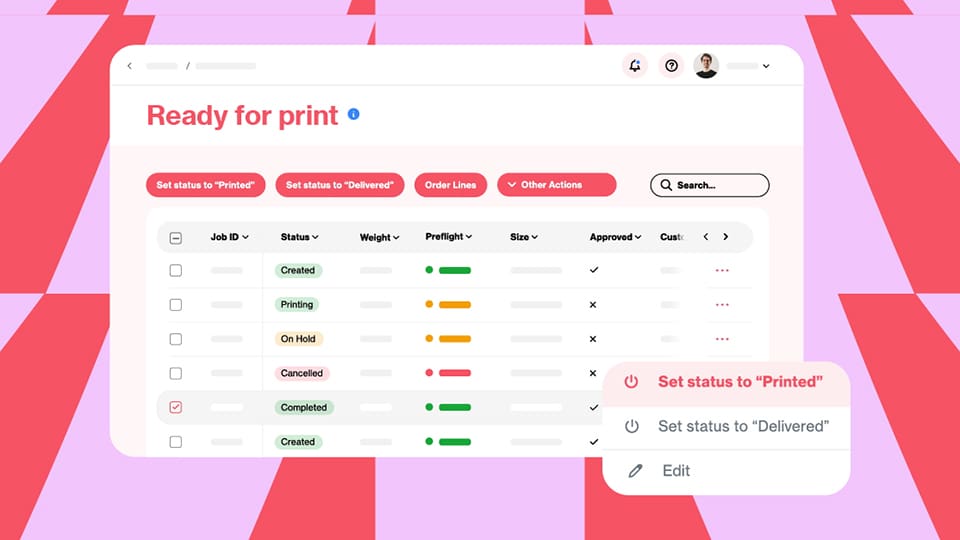
Another player in the workflow space is ZenSmart, a cloud and locally installed workflow automation platform provided through Transeo Media. The system provides a total automation solution for print on demand companies involved in areas like photo printing, merchandise, and display products.
Neil Bather, managing director of Transeo Media, says: “What makes ZenSmart different is that it has been built as a no code/low platform enabling you to design your own custom workflows without needing development support. It comes out of the box ready to integrate with a wide variety of e-com platforms such as Amazon, Shopify, WooCommerce, and Etsy, as well as MIS platforms like PrintIQ, powerful editor platforms such as Taopix, and Web2Print platforms from DecoNetwork to Printify and Gooten.”
Speaking of the benefits of ZenSmart as a integrated workflow automation solution, Bather says that the platform can automate manufacturing all the way to shipping, and every stage in between.
Bather adds: “From a functionality perspective ZenSmart directly integrates with many order sources such as popular shopping carts and web-to-print systems and has a powerful ZenSmart easyAPI for integrating custom order sources.
Beware of solutions that overpromise but lack flexibility, locking you into specific hardware or workflows
“It will retrieve the order and artwork files regardless of the source, process the orders automatically making any adjustments required, queue the orders based on your queue rules and then automatically create optimised batches to your business and SLA rules. It features a powerful Imposition Designer to create imposition recipes so that when your batches are imposed they are automatically created with all the custom marks, barcodes, and instructions to automate finishing. Importantly imposition is done just-in-time so that you can select the press-finishing combination required based on machine availability and workload.”
When customers look to invest in workflow software, Bather highlights the misconception that automation is ‘hard’ or requires a ‘big investment’ and can cause disruption. “The reality is that automation can be implemented in a very structured way that minimises risk and enables you to control your costs,” explains Bather, who adds: “ZenSmart enables a single product code or a product group to be easily automated end-to-end and used to validate your workflow before scaling up the implementation.
In that way you control the deployment to the rate of change that you are comfortable with, and you minimise the up-front investment.”
Bather concludes: “It’s easy – start off with a product, expand to a department and then automate the factory. It’s also important to sell the benefits of automation to the team rather than it being seen as change that is imposed on them.”
Seamless Integration
Also commenting on the subject is Wayne Bodimeade, director of VB Media, which provides web-to-print solutions to print businesses. Part of this offering, Bodimeade says, is an in-built order management tool, which he bills as an effective workflow solution for printers.
“The tool can also be used to manage the process whereby orders are either assigned to in-house production or trade suppliers, providing notifications about missing artwork, and show each order’s status,” Bodimeade explains, continuing: “The system also gives users an overview of each customer’s order history, emails, and payment history.
“The VB Media system is by no means an MIS. We initially built it as a way for users to process the orders placed on their websites but driven by customer demand we’ve expanded its capabilities so that it is now fairly comprehensive as a basic workflow tool. Customers on our Pro tier even have the option to use it to create their own workflows to suit their business needs.”
In terms of more general advice on workflow software solutions, Bodimeade says PSPs need to keep two key things in mind when investing: software should be about helping save time or enabling new capabilities.
“If a piece of software isn’t going to do one of those two things, or if it is going to add extra steps to your processes instead of freeing up time or resources, you may want to think again before investing,” he advises.
These closing comments from Bodimeade, offer an apt conclusion to this piece. While there are indeed plenty of options out there for PSPs to consider, they need to think about exactly what they want to achieve, and match this up with what is offered by each software solution.
As Bodimeade says, the purpose of software is to make life easier for print businesses, not add another step to an already lengthy process. It's best to speak with providers to learn more about their latest solutions and do your due diligence before making a decision on how you want to move forward with your workflow.
From advances in print quality and productivity to increasing demand for automation and sustainable solutions, the wide-format market continues to evolve. Rob Fletcher looks at the latest trends, challenges, and developments in this sector
Speaking to a range of print and signage professionals, we discover how a sustainable business model can drive growth, outlining actionable strategies to cut overhead costs, improve eco-efficiency, and boost your bottom line
As finishing continues to become a great way to add extra elements to your print and wow customers, we take a look at some of the creasers, folders, and collators on the market, and ask experts their advice on finding the right solutions
(this was inserted into the PHP of a code block)
Watch our latest video of the week
Print Monthly gives you the latest video coverage of companies, people, and events from within the print industry.